
You are using an out of date browser. It may not display this or other websites correctly.
You should upgrade or use an alternative browser.
You should upgrade or use an alternative browser.
Site Update 4/4/2019
- Thread starter Ari Gold
- Start date
ironkill
Well-known member
Perhaps Im explaining it incorrectly. There was a small red arrow on the left side of the thread title that would take to me the last post as you say.. but now if i click on the date as you say, it takes me to just to the post, rather than the last post i finished off.
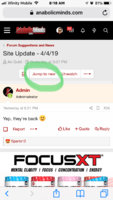

yes thats it, sorry it was hard to explain but you nailed exactly what i was trying to get across
It does it for you. If the thread title is bold, it will take you to the first unread post when you click it. If its not bold, you've read the entire thread....and if you just want to go to the last post, click the date on the right.

The Solution
Legend
Huh?On mobile the title of this thread is : cannabis for a better body! No joke - cant wait for ios app update and the new speed on mobile amazing even with bugs

MrKleen73
Legend
Oh it is doing it now but yesterday it was not. I am sure that had to do with the databases still being moved. Once it didn't do that the first time I assumed the feature just hadn't been turned on. Now it is automatic which is even better.It does it for you. If the thread title is bold, it will take you to the first unread post when you click it. If its not bold, you've read the entire thread....and if you just want to go to the last post, click the date on the right.
Yeah we are doing so many little updates at a time. So many features people don't know about..its like an Iphone..most people don't know 99% of the stuff they can do.Oh it is doing it now but yesterday it was not. I am sure that had to do with the databases still being moved. Once it didn't do that the first time I assumed the feature just hadn't been turned on. Now it is automatic which is even better.
The Solution
Legend
Aye!It does it for you. If the thread title is bold, it will take you to the first unread post when you click it. If its not bold, you've read the entire thread....and if you just want to go to the last post, click the date on the right.
if you click on the time (on the right hand side) that takes you to the latest post. same with clicking under the thread title to the date
Thanks!
Attachments

MrKleen73
Legend
This worked for me the one time however now it just takes me to the first post again on the other bolded threads. I realize it could just be the database updating but figured I would mention it just in case it is something that actually needs corrected.Oh it is doing it now but yesterday it was not. I am sure that had to do with the databases still being moved. Once it didn't do that the first time I assumed the feature just hadn't been turned on. Now it is automatic which is even better.
Also, not sure if I missed a request but can we get a Cancel option on the posts.
How do you do the multiquote option now? I was able to add things to the multiquote but do not see a button or anything to actually post it. I figured maybe if I did the multi then hit reply it would add the other selected posts to the reply but it only put the final quoted post in the reply area.
This worked for me the one time however now it just takes me to the first post again on the other bolded threads. I realize it could just be the database updating but figured I would mention it just in case it is something that actually needs corrected.
Also, not sure if I missed a request but can we get a Cancel option on the posts.
How do you do the multiquote option now? I was able to add things to the multiquote but do not see a button or anything to actually post it. I figured maybe if I did the multi then hit reply it would add the other selected posts to the reply but it only put the final quoted post in the reply area.
Strange, works fine for me.
Cancel what?
I don't even know yet..LOL
Yeah we are doing so many little updates at a time. So many features people don't know about..its like an Iphone..most people don't know 99% of the stuff they can do.
Aye!
if you click on the time (on the right hand side) that takes you to the latest post. same with clicking under the thread title to the date
Thanks!
testThis worked for me the one time however now it just takes me to the first post again on the other bolded threads. I realize it could just be the database updating but figured I would mention it just in case it is something that actually needs corrected.
Also, not sure if I missed a request but can we get a Cancel option on the posts.
How do you do the multiquote option now? I was able to add things to the multiquote but do not see a button or anything to actually post it. I figured maybe if I did the multi then hit reply it would add the other selected posts to the reply but it only put the final quoted post in the reply area.
This worked for me the one time however now it just takes me to the first post again on the other bolded threads. I realize it could just be the database updating but figured I would mention it just in case it is something that actually needs corrected.
Also, not sure if I missed a request but can we get a Cancel option on the posts.
How do you do the multiquote option now? I was able to add things to the multiquote but do not see a button or anything to actually post it. I figured maybe if I did the multi then hit reply it would add the other selected posts to the reply but it only put the final quoted post in the reply area.
test
Strange, works fine for me.
Cancel what?
I don't even know yet..LOL
test
test
testing

00A
Well-known member
Invalid Link Removed Cannabis for a better body? - Im confused myselfI’m confused on this one as well.
Figured it out. Some threads from past day or two did not get included in the update as we had to stop testing so when new threads were created, it took the threadID number and now there is a conflict. It should only happen to very few threads and after today won't happen with any more new threads.
MrKleen73
Legend
Got it on the First Unread post thing!!!test
test
testing
Still not a Cancel option in post editor / reply field though. Just Post Reply, and Preview. When I navigated away from a post without canceling it the text showed up in the editor when I went to reply to another post. So a cancel option like we used to have would be great unless it is going to just clear the editor when we leave the page.
Give me a minute to watch that multi-quote video and I will test it out too. Thanks!
MrKleen73
Legend
Figured it out. Some threads from past day or two did not get included in the update as we had to stop testing so when new threads were created, it took the threadID number and now there is a conflict. It should only happen to very few threads and after today won't happen with any more new threads.
Funny your Notification showed the normal Title but any post won't. Oh well, might just start a new thread.
Sweet!!!! You guys are kicking ass at getting to all of this stuff!There.
MrKleen73
Legend
Does it only push notifications for PM's or any thread in your Watched List? I will add if only for PM but don't want notifications every time a Watched list thread is updated. A lot of the time I am on here is during slow times at work and I don't want to get tons of notifications.Has anyone enable push notifications for Chrome and is it working?
MrKleen73
Legend
I just enabled them. I did not use when a thread is updated but did for when I was quoted. So if you quote this one i should get a push notification of it and will let you know.You have a lot of options of specific things you can enable/disable push notifications for.
chedapalooza
Legend
Subd. I’m noticing on mobile that all threads I’m subscribed to show as unread
The Solution
Legend
Will there be a section for product reviews? or is that no longer going to be on AM?
Will there be a section for product reviews? or is that no longer going to be on AM?
Working on it
Subd. I’m noticing on mobile that all threads I’m subscribed to show as unread
Mark them read. lol
chedapalooza
Legend
Mark them read. lol
All 999+? I’ve been on here 9 years lmao... brb in 5 hours

I just enabled them. I did not use when a thread is updated but did for when I was quoted. So if you quote this one i should get a push notification of it and will let you know.
Consider yourself quoted!
The Solution
Legend
Is the feature to search within a thread been disabled?
It helps get to old information when threads get 10-20-100 + Pages long
It helps get to old information when threads get 10-20-100 + Pages long
Last edited:

jtmass
Well-known member
It works!Has anyone enable push notifications for Chrome and is it working?
The Solution
Legend
Looks like some people when posting threads are making multiples
Invalid Link Removed
for example the Focus XT Deal
Invalid Link Removed
for example the Focus XT Deal
No. If you click search in the top right, there is a dropdown box that has "This Thread" as an option.Is the feature to search within a thread been disabled?
It helps get to old information when threads get 10-20-100 + Pages long
The Solution
Legend
Just tried to use it to search for my PES Strawberry Cheesecake Review in the "In This Mail Thread"No. If you click search in the top right, there is a dropdown box that has "This Thread" as an option.
Typed in PES Strawberry Cheesecake and clicked on supplement portion, and nothing came up.
But I went into the thread and had to manually scroll through the pages to find it.
Invalid Link Removed
This works now.Just tried to use it to search for my PES Strawberry Cheesecake Review in the "In This Mail Thread"
Typed in PES Strawberry Cheesecake and clicked on supplement portion, and nothing came up.
But I went into the thread and had to manually scroll through the pages to find it.
Invalid Link Removed
The Solution
Legend
Sure doesThis works now.
thank you
